The 2026 workbook · US rentals
A clearer picture of every rental, in one spreadsheet.
Small Landlord Ledger brings rent, expenses, deposits and tax-time references together for 1–50 properties. Built for Microsoft Excel and Google Sheets, with 21 tabs, no macros, no subscription and no account.
One-time purchase · sample and blank workbooks · 17-page PDF guide
See what the file does
From daily entries to a useful year-end view.
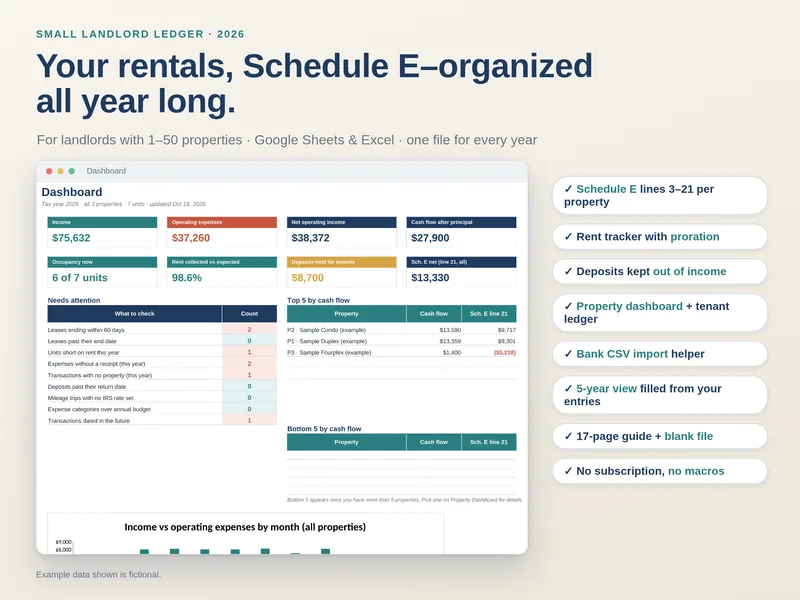
Enter records in the workbook’s input areas. The reports draw from those dated rows, so you can look at one property or the whole portfolio.
Know what needs attention.
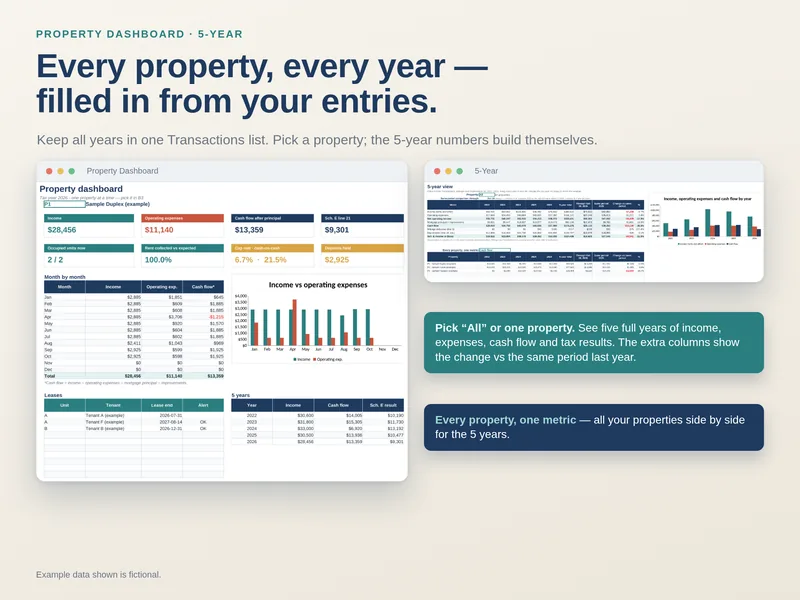
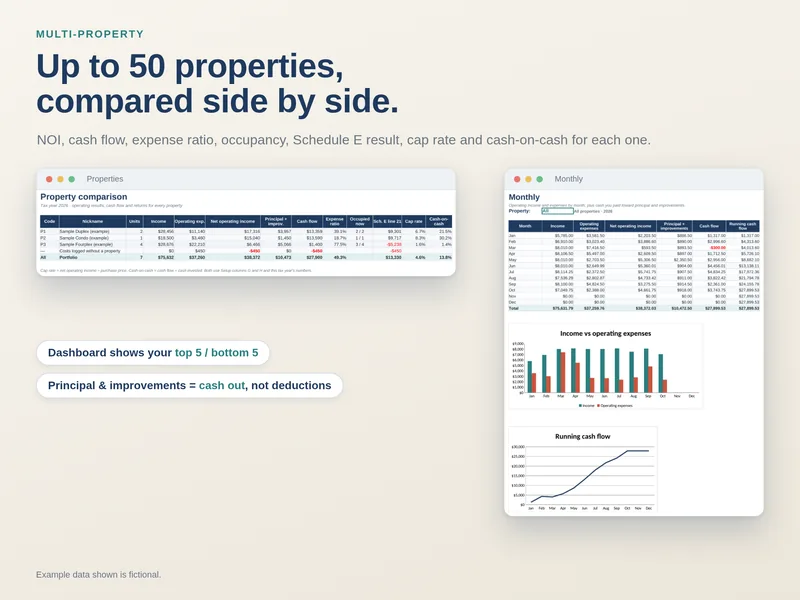
The Dashboard summarizes income, operating expenses, cash flow, occupancy, rent collected and deposits held. Property Dashboard narrows the view to one rental with monthly results, leases and five-year history.
The 5-Year tab compares full years and shows year-to-date against the same dates last year.
See what was due and what came in.
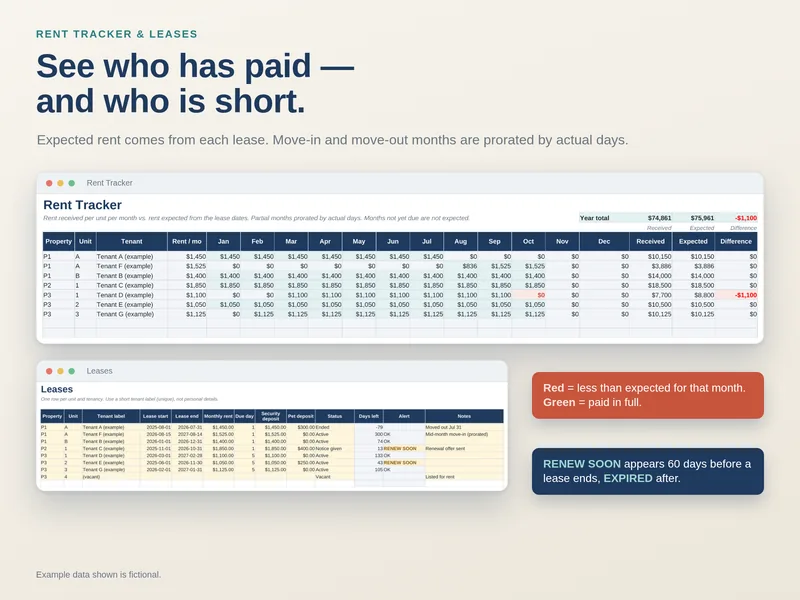
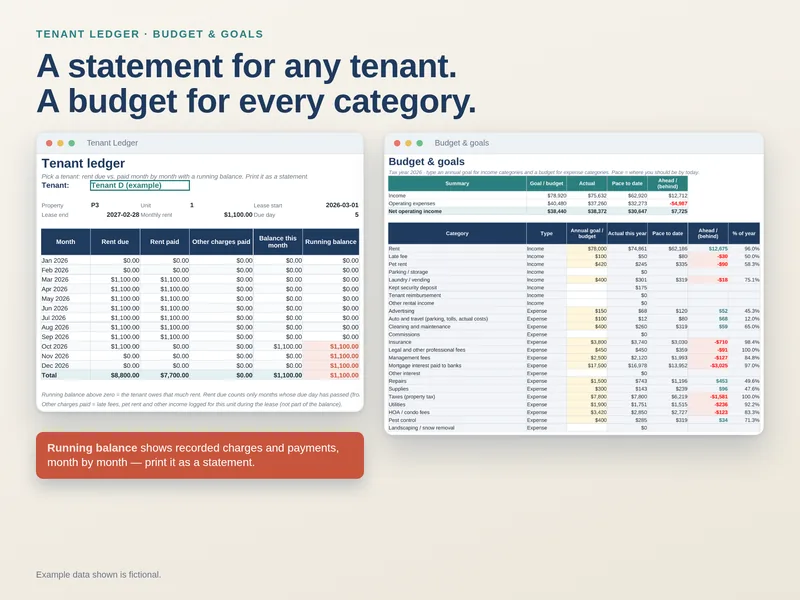
Rent Tracker compares expected and received rent by unit and month. Tenant Ledger gives a printable statement with rent due, rent paid, other charges and a running balance.
Leases holds up to 150 tenancies and flags renewals within 60 days and expired leases.
Keep the details that matter.
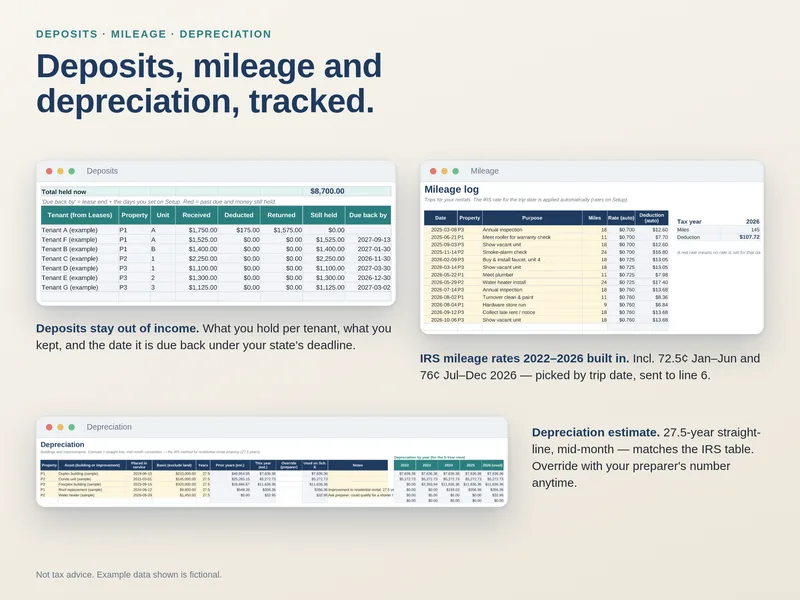
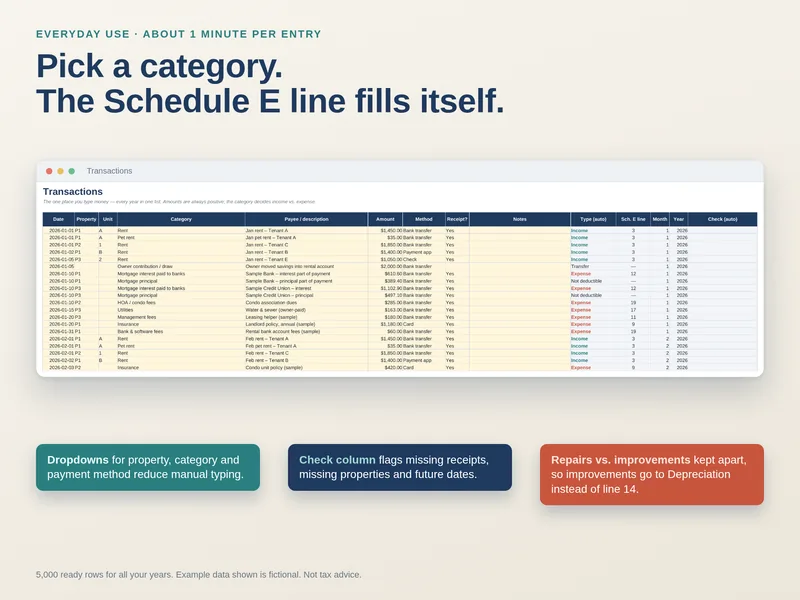
Transactions keeps every year in one list. Deposits records money held, deductions and returns separately from rental income. Mileage applies the IRS business standard rate for each trip date, with rates for 2022–2026 already entered. Budget compares actual spending with annual category targets.
Paste bank rows, then review each suggestion.
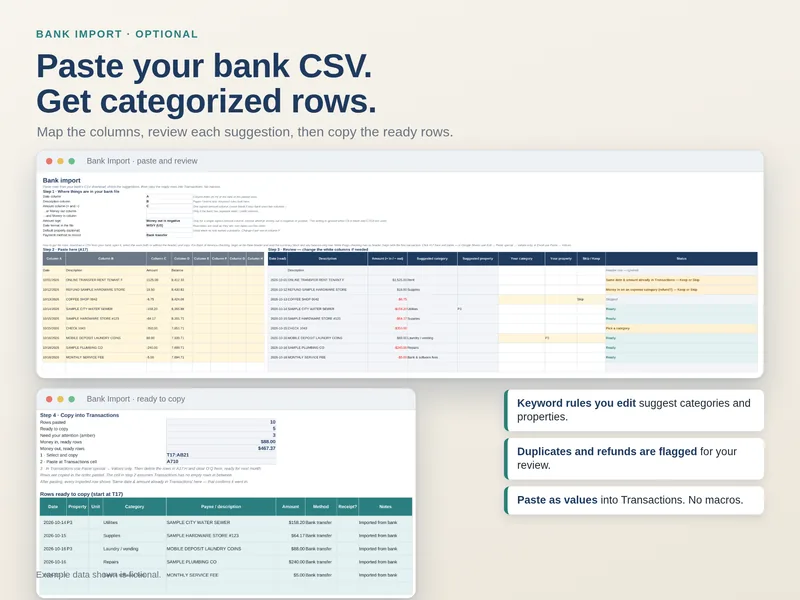
Bank Import accepts up to 500 pasted CSV rows per batch. Map date, description and amount columns; 80 editable keyword rules can suggest a category and property. Duplicate, refund and invalid-row flags prompt review. Then manually copy and paste ready rows as values into Transactions. There is no bank connection or automatic sync.
Organized around Schedule E.
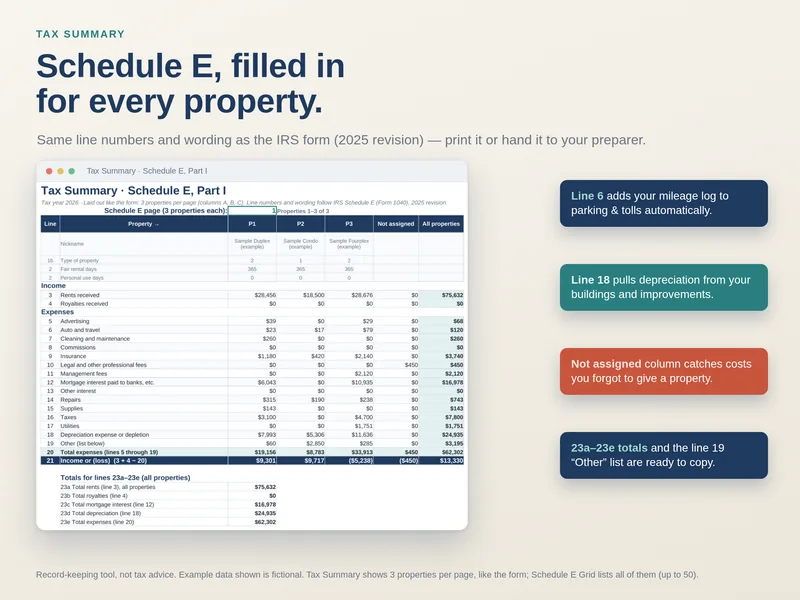
Tax Summary and Schedule E Grid map rental categories to IRS Schedule E (Form 1040) Part I lines for each property. Depreciation estimates residential rental building and improvement amounts, with an override for your preparer’s figure.
Reference only: this is not tax software and does not file a return. Line mapping follows the 2025 form; the 2026 revision has not yet been published.
A closer look
Watch the 2-minute narrated tour.
An animated walkthrough built from real sheet screenshots, with a computer-generated voice. It shows the workbook’s flow; it is not a live screen recording.
More real views
Look inside the workbook.
All screenshots show fictional sample data. The blank workbook has no example entries.
Make an informed choice
What to check in a landlord spreadsheet
Here are this workbook’s answers. Check the same points in any spreadsheet you consider.
| Criterion | Small Landlord Ledger |
|---|---|
| Schedule E Part I line mapping | Yes, per property; 2025 form lines |
| Deposits separate from income | Yes; kept portions recorded as income |
| IRS mileage rate by trip date | Yes; 2022–2026 rates entered |
| Depreciation | Estimate with manual override |
| Bank CSV import | Paste rows, map columns, apply keyword rules; manually paste ready rows |
| Multiple years in one file | Yes; five-year view |
| Property limit | 50 |
| Excel + Google Sheets | Built for both; no macros |
| Price and refund | $14.99 one-time; email within 14 days for a full refund |
Capacity at a glance
50 properties · 150 leases · 5,000 transactions across all years · 600 trips · 400 deposit entries · 100 depreciable assets · 200 maintenance items · 40 categories.
When this may not fit
You manage more than 50 properties, need multiple currencies or a non-US tax form, or want tenant portals, online rent collection or automatic bank sync.
The whole workbook
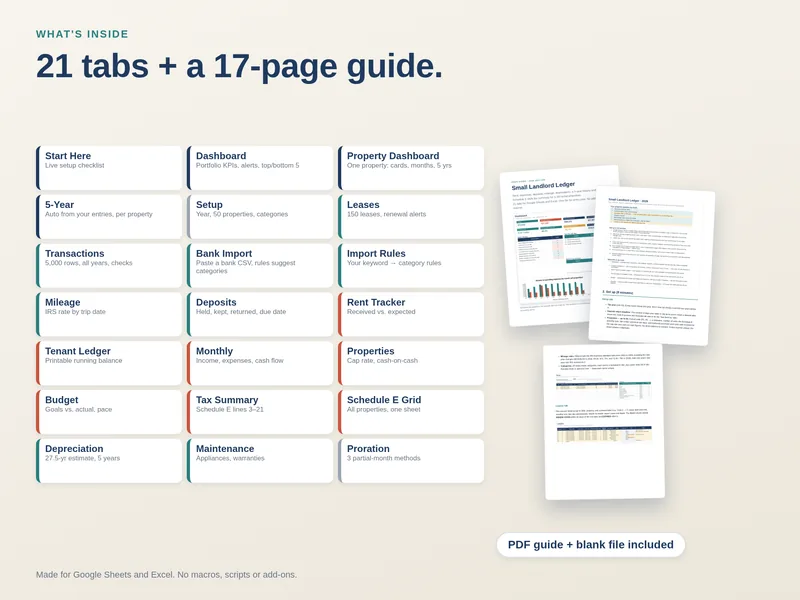
21 tabs, one file.
Start Here · Dashboard · Property Dashboard · 5-Year · Setup · Leases · Transactions · Bank Import · Import Rules · Mileage · Deposits · Rent Tracker · Tenant Ledger · Monthly · Properties · Budget · Tax Summary · Schedule E Grid · Depreciation · Maintenance · Proration
Useful limits to know
Bank Import does not handle decimal-comma amounts such as 1.234,56. Its behavior with a real bank CSV has not been verified in Excel or Sheets. The workbook was recalculated in LibreOffice and re-imported into Google Sheets; it has not been tested in a real Excel installation.
Excel formula cells are locked without a password. The included Google Sheets “Make a copy” version has warning-level protection: you can click OK and edit a formula. Importing an .xlsx into Sheets loses its protection.
Simple pricing
Keep your records in a file you control.
The spreadsheet stays on your computer or in your Google account. No recurring software fee, account or macro.
Questions before buying? Email Gary.
- Sample-filled Small-Landlord-Ledger-2026.xlsx
- Empty Small-Landlord-Ledger-2026-Blank.xlsx
- 17-page PDF user guide
- Google Sheets “Make a copy” link
Stripe handles payment and redirects to a download page. Email within 14 days of purchase for a full refund.
Questions
Before you buy
Do I need Microsoft Excel?
No. The purchase includes a Google Sheets “Make a copy” link. The .xlsx files are built for Excel and Google Sheets without macros. This version has not been opened in a real Excel installation.
Can I import the Excel file into Google Sheets?
Yes. You can import the .xlsx, but its Excel sheet protection will not carry over. The included Sheets copy link has warning-level formula protection; Sheets lets you click OK to edit.
What about Excel on a Mac or Apple Numbers?
The workbook is built for Microsoft Excel on Windows or Mac, though this version has not been tested in a real Excel installation. Apple Numbers and other spreadsheet apps are not supported or tested.
Is this tax software?
No. It is a record-keeping workbook with Schedule E (Form 1040) Part I line references and a depreciation estimate. It does not file returns or replace a tax professional. The mapping follows the 2025 form because the 2026 revision is not yet published.
How many properties and records can it hold?
Up to 50 properties, 150 leases, 5,000 transactions across all years, 600 trips, 400 deposit entries, 100 depreciable assets and 200 maintenance items.
Who sees my rental data?
The workbook lives on your computer or in your own Google account. We never receive what you type into it. See the privacy policy for site analytics and payment details.
How does delivery work?
After Stripe payment, you are redirected to a download page with the sample file, blank file, PDF guide and Google Sheets copy link. Save copies of the files.
What if I lose a file?
Email [email protected] from the address used for payment and we can resend the download information.
What is the refund policy?
Email [email protected] within 14 days of purchase for a full refund.